

Plenty of small business owners set up Google Ads themselves using Google’s simplified Smart mode, then leave it running. For some, the enquiries come in, the cost seems reasonable, and there’s no obvious reason to touch it.
I recently took on an account like this. It had been running in Smart mode for more than five years on a modest budget, and on the surface it was doing fine, with a steady flow of enquiries at a cost the owner was happy with. But once I looked inside, there were a range of issues that the simplified dashboard inside Smart mode would struggle to convey.
None of them are unusual. If you run your own Google Ads account in Smart mode, there’s a good chance at least one of these applies to you. At the end, I’ll cover the alternatives to Smart mode and how to choose between them.
What Smart mode does, and what it hides
Smart campaigns are Google’s simplified version of Google Ads. You write some copy, choose keyword themes, set a budget, and Google handles the rest: which searches you appear for, where your ads show and how much you pay per click.
For a busy business owner, that’s appealing. The trade-off is control and visibility, and two gaps matter most:
- You can’t see which searches are winning you customers. You can see the search terms that led to clicks, but not which of those clicks turned into enquiries. So you can’t tell which searches are actually making you money.
- You have little say over where your ads appear. Smart campaigns can show on Google Search, Google Maps and websites across Google’s Display network, and Google decides the mix.
Your budget may be going to Display, not Search
When someone searches for “plumber near me”, they have a problem and want it solved. That’s the moment you want your ad in front of them.
Display ads work differently. They appear on third-party websites, apps and other places that sell ad space through Google, in front of people who are busy reading or doing something else. That has pros and cons:
- Clicks are much cheaper, but far fewer people click, because they weren’t looking for you. The click-through rate on Display is typically a fraction of what you’d see on Search.
- It can reach people before they start searching, which can work well for some businesses.
- Your brand can appear on sites you wouldn’t choose. In Expert mode you can see exactly where your ads appeared and exclude sites or types of content. In Smart mode you can’t.
In the account I took on, most of the spend had defaulted to Display rather than Search. My reading is that with a modest daily budget, Google put the money where it could spend it cheaply and still find some enquiries.
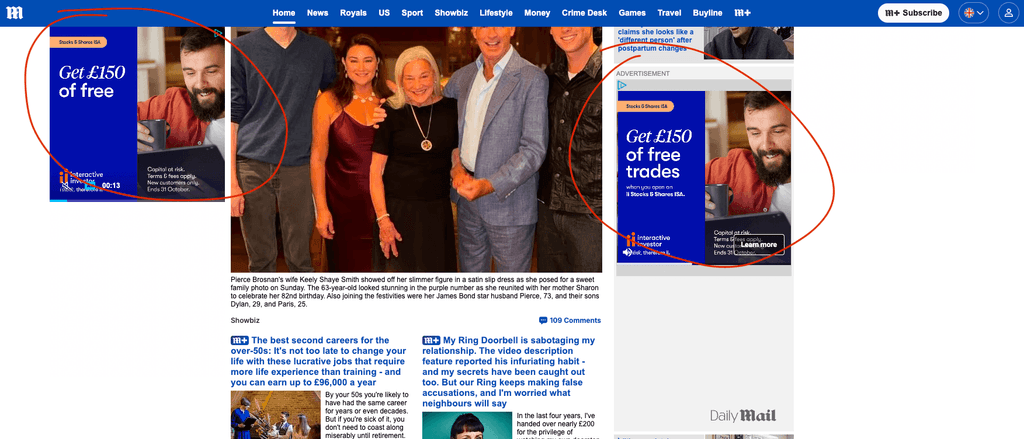
In this case, Display was genuinely working. It was bringing in enquiries at a reasonable cost, so I didn’t switch it off. But the business was barely showing up for the searches that matter most.
A dedicated Search campaign can change the picture
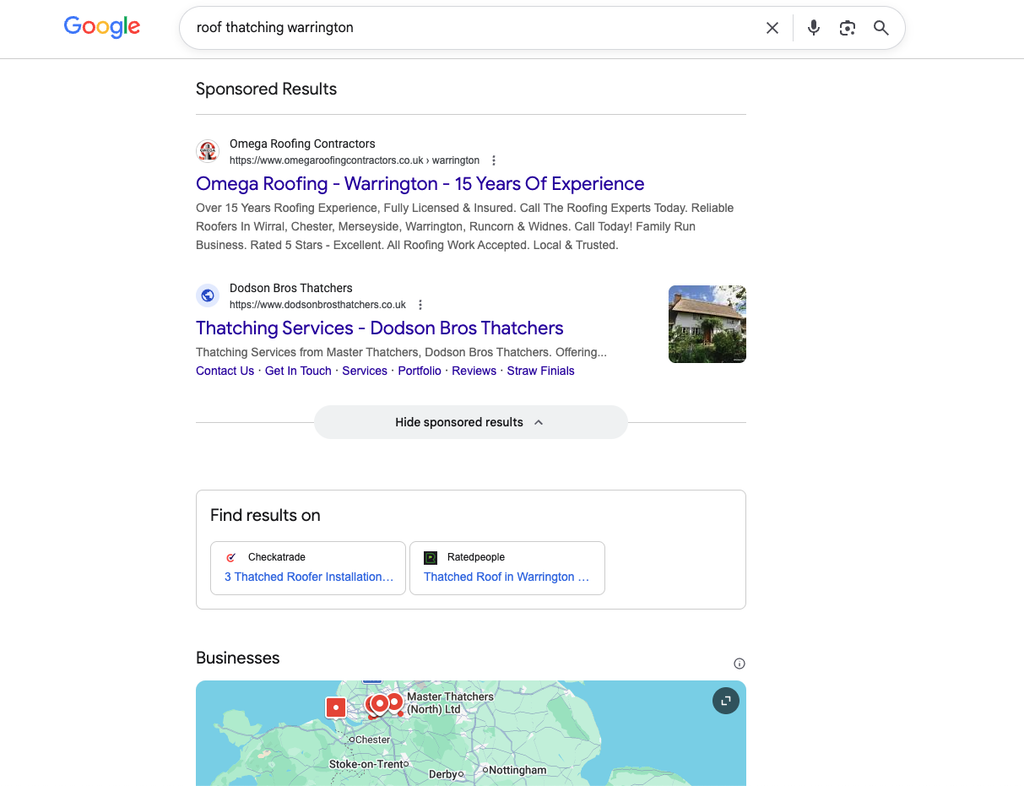
My initial fix was to add a standard Search campaign alongside the Smart one, targeting the services the business most wanted to win. A search-only campaign will appear above the results on Google’s standard search engine results pages (SERPs). The existing Smart campaign kept running as it was.
Below is an example of a random industry search, unrelated to the client in question, designed to illustrate a purely Search based ad on Google. You can see that the two ads are clearly labelled as Sponsored Results, although Google play with this design frequently.
The early numbers, from the first couple of weeks, are striking:
- The Smart campaign turned around 5 to 7% of clicks into enquiries.
- The new Search campaign turned around 40% of clicks into enquiries.
- The cost per enquiry was almost identical, at roughly £5 each.
That last point needs explaining. Display clicks are much cheaper, which is why their cost per enquiry holds up despite so few of them converting. Search clicks cost more, but far more of them turn into enquiries, because the person was actively looking for the service.
A few weeks isn’t long enough to draw firm conclusions. But the business is now winning enquiries from Search that it simply wasn’t competing for before, without losing what Display already brought in. And because people from Search came looking for the service, I’d expect those enquiries to be better quality. That’s something I’ll be excited to confirm over the coming months.
You may be paying for people who were already looking for you
The account was also bidding on the business’s own name, and the owner wasn’t aware.
When someone searches for your business by name, they already know who you are. Most of them would find you in the free search results anyway. Paying for that click adds cost, and it makes your advertising look better than it is, because those enquiries would probably have happened without the ad.
Smart campaigns let you add negative keyword themes, which stop your ads showing for searches you choose. Adding your business name as one gives you a much more honest view of what your advertising is actually achieving.
There’s one exception. If competitors are bidding on your name to put their ads above yours, it can make sense to bid on it yourself. In that case, run brand searches as a separate campaign, so they don’t blur the results of the rest of your advertising.
Your conversion figures may be inflated
Google Ads can count conversions in two ways: every time someone completes an action, or once per click. For an online shop, counting every sale makes sense. For a business that generates enquiries, it doesn’t. If one person calls you twice, or fills in your form and then rings, that’s one potential customer, not two.
This account was counting every conversion. That inflates the numbers and makes the cost per enquiry look lower than it really is. It’s a single setting on each conversion action, and for most service businesses it should be set to “One”.
What to check in your own account
If you run Google Ads yourself in Smart mode, these four checks take less than half an hour:
- Where your ads are showing. Check how much of your spend goes to Search compared with other placements.
- Whether you’re bidding on your own name. Look through your search terms for your business name, and add it as a negative keyword theme if it’s there.
- How conversions are counted. Check the settings on each conversion action. For enquiries, “One” is usually right.
- Whether a Search campaign would help. If most of your budget goes elsewhere, a separate Search campaign for your main services is worth testing.
What are the alternatives to Smart mode?
Fixing the settings above will improve a Smart campaign, but only so far. To go further, you need Expert mode, the full version of Google Ads.
Switching to Expert mode
Expert mode is a setting on your account, not a separate account. Switching gives you:
- More detailed reporting. You can break results down by campaign, keyword, device, location and time of day.
- A clear view of what’s working. You can see which searches bring in clicks and which turn into enquiries, so you can put more money behind the winners and cut the rest.
- More control over your ads. You decide what your ads say, which extras appear with them (such as your phone number, extra links or customer ratings), where they show and who sees them.
Two things to know before you switch. First, it can’t be undone. Once an account is in Expert mode, you can’t go back to Smart mode. Second, your existing Smart campaign keeps running, so you don’t lose what’s already working.
In practice, there’s little to lose, as long as you’re willing to spend some time learning your way around, or you plan to bring in someone who knows the platform. Expert mode is less forgiving if you set things up and walk away, which is the main reason Smart mode exists.
Which campaign type should replace it?
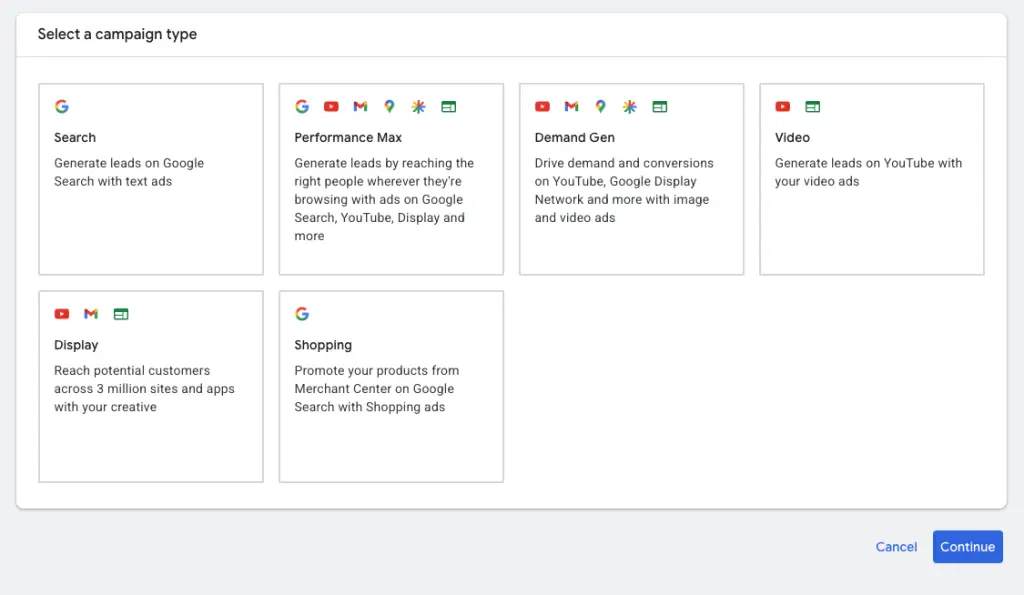
Expert mode opens up an array of campaign types. For a small business moving on from Smart mode, here are a few options:
- Search campaigns, if you want to focus on people actively in research or buying mode. Search is still the best place to reach people who are ready to buy or enquire, and it gives you the most control over which searches you appear for and what your ads say. For most service businesses, this is the place to start.
- Performance Max, if you still want Google to find customers across lots of places at once, including Search, Display, YouTube, Gmail and Maps, but want more say than Smart mode gives you. You supply the headlines, descriptions, images and videos, can exclude your brand name and unwanted searches, and get better reporting on where results come from. It works best with reliable and detailed conversion tracking and enough budget for Google to learn from.
- Demand Gen, if you want to reach people before they start searching. These ads appear in places people browse rather than search, such as YouTube, Gmail and Google’s Discover feed, using images and short videos. It suits building interest in a product or service people may not know they need yet, and it’s a good way to re-engage people who have already visited your site (remarketing).
- Video, if you have video content and want to get it in front of the right people on YouTube. You can target by interests, topics or audiences such as past website visitors. It’s usually better for building awareness than for getting immediate enquiries, so it works best alongside Search rather than instead of it.
- Display, if you want image ads shown across millions of websites and apps in Google’s network. Display is cheap per click but people are less likely to act straight away, so it’s most useful for remarketing, showing ads to people who have already visited your site while they’re still deciding. Remarketing needs a reasonable amount of website traffic to work, so it’s usually a second step rather than a first. However, as identified earlier in this article, sometimes Display can work off the bat.
- Shopping, if you sell physical products online. Shopping ads show your product image, price and shop name directly in Google’s search results, which tends to attract people who are want to purchase online. You’ll need a product feed set up in Google Merchant Center, so it’s only an option for businesses with an online shop.
These aren’t either/or choices. A common setup is a Search campaign for your main services, with remarketing or Performance Max alongside it once the basics are working.
Do you need an expert?
Not necessarily for good. Smart mode isn’t wrong, and plenty of business owners run it perfectly well. But a short spell of expert input, to review the account, fix the settings and set up the right campaigns in Expert mode, can leave you with a much stronger account that you can run yourself afterwards.
For more settings worth checking, see these 16 commonly missed settings in Google Ads. If you’d like someone to look over your account, that’s what my Google Ads management service is for.



Leave a Reply