

Before you can start advertising on Google Shopping, you need two key things in place: a Google Merchant Center account and a product feed. Think of the Merchant Center as your business’s central hub for product information, and the product feed as a detailed inventory list you provide to Google. Getting this right is what allows your products—with their images and prices—to appear in search results when people are looking to buy. It’s a direct way to reach shoppers at the moment they are ready to make a purchase.
Why Google Shopping is a Sensible Choice for Midlands Businesses
If you run a small or medium-sized business in Leicester or anywhere across the Midlands, you know how competitive the online market can be. Google Shopping isn’t just another channel to spend money on. It is a direct line to customers who are actively searching for the products you sell. It cuts through the noise of traditional text ads by showing your products visually.
The difference is simple. A standard search ad tells someone what you offer. A Shopping ad shows them. This visual approach is effective because it lets people compare products, prices, and brands at a glance, before they click through to your website. This means the traffic you receive is often better qualified and closer to making a purchase.
Your Customers Are Already Searching Here
Your customers in the UK are on Google. The platform holds a 93.24% market share of all UK searches, making it the primary tool for product discovery. This large audience is what powers Google Shopping. For retailers, these visual ads are responsible for a significant 85.3% of all clicks on Google Ads, which demonstrates how effective they are at capturing attention. You can review these market share trends on Statista.
This isn’t about following a trend; it’s about meeting your customers where they already are.
For a local business, the opportunity is clear. You are not just competing on a national scale; you can adjust your campaigns to attract buyers in the Midlands, turning local searches into sales.
To put the UK opportunity into perspective, let’s look at some key figures.
Google Shopping at a Glance for UK SMEs
| Metric | UK Average Figure | What This Means for You |
|---|---|---|
| Google’s UK Search Market Share | ~93% | The majority of your potential customers use Google to find products. |
| Retail Clicks from Shopping Ads | 85.3% of Google Ads clicks | Visual ads are the main way shoppers engage with retail advertising on Google. |
| Conversion Rate Lift | Up to 30% higher vs. Text Ads | Shoppers who click are better informed and more likely to buy, improving your return on ad spend. |
| Mobile Shopping Searches | Over 75% of searches | Your ads should be designed for mobile devices, as that is where most people start their search. |
These figures represent a tangible opportunity for businesses in places like Leicester, Nottingham, and Birmingham to compete effectively online.
The Real-World Benefits for Your Business
When you set up Google Shopping correctly, the results can be significant. It is one of the most direct ways to increase your online visibility and drive interested traffic to your website. Here’s what that looks like in practice for a local SME:
- Better Quality Leads: People see your product and its price before they click. This pre-qualification means the visitors you pay for are already interested, which can lead to better conversion rates.
- Prime Visibility: Your products can appear at the top of the search results page—often above standard text ads and organic listings. This gives your brand prominent exposure.
- Wider Reach, Less Hassle: A single Shopping ad can be triggered by many relevant search queries. You do not have to manually bid on every single keyword, which makes expanding your reach more efficient.
Getting Your Foundations Right: Google Merchant Center and Your Product Feed
Before you can run Google Shopping ads, you need to prepare your accounts. That starts with the Google Merchant Center. Think of it as your control panel – it’s where you upload all your product information so Google knows what you are selling.
This information is organised into a product feed. Essentially, it is a detailed file that describes every item you sell. Getting this feed right is essential. An error, a missing detail, or an inaccurate price can cause your products to be disapproved, making them invisible to shoppers. It requires attention to detail, but it is manageable for any business owner.
This process underpins the journey from a customer’s initial search to a sale on your website.
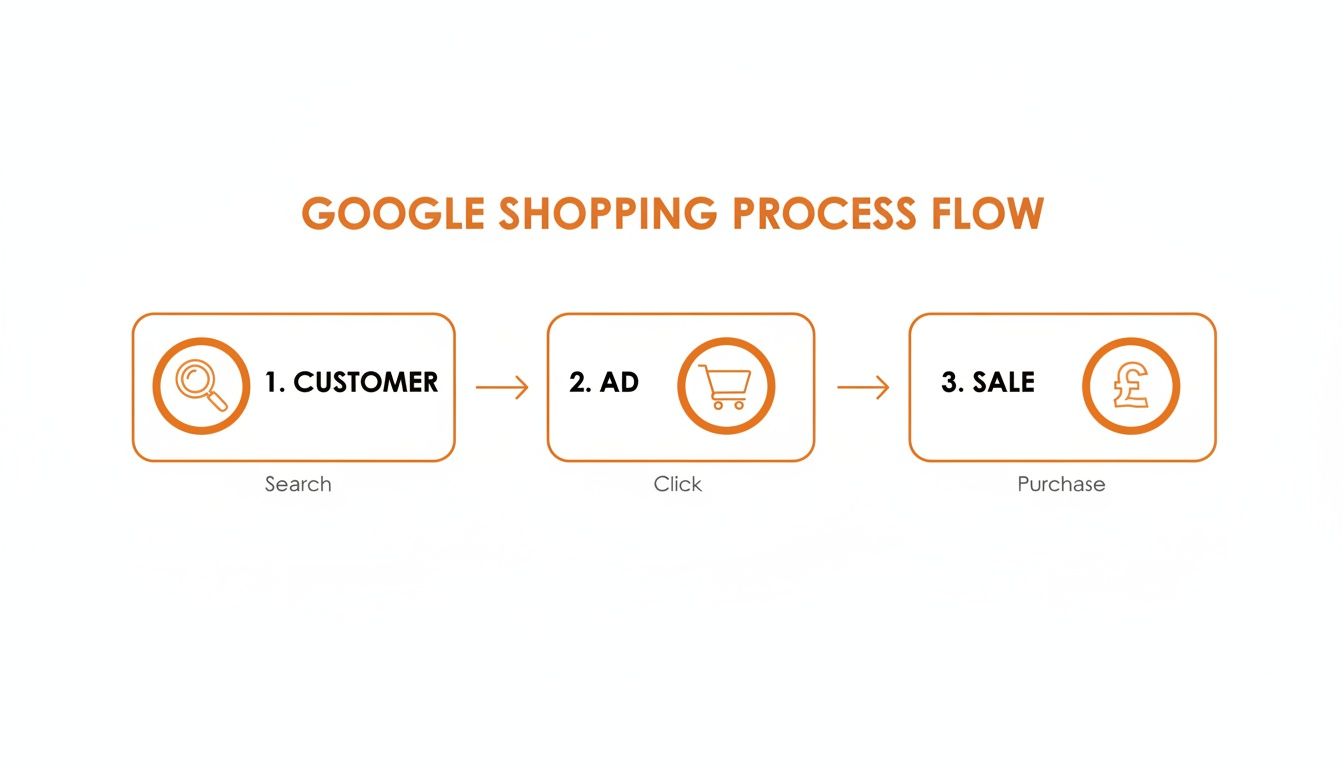
As you can see, your product feed is the engine driving everything. Its accuracy determines the success of your campaigns.
Setting Up Your Merchant Center Account
Creating your account is straightforward. Go to the Google Merchant Center website, log in with your Google account, and fill in your business details. For any Midlands-based business, it’s important to set your tax and delivery settings correctly from the start.
Pay special attention to these three areas:
- Business Information: Check that your business name and website are correct. You will need to verify and claim your website URL to prove to Google that you own it. This can usually be done by adding a small tag to your site’s code or linking it with Google Analytics. If you’re new to this, our guide on how to use Google Search Console explains the verification process.
- Delivery: Be specific here. Set up your delivery options to reflect how you ship across the UK. Whether you have different rates for different regions, offer free delivery over £50, or have a flat rate, it must be included. Shoppers see this information in the ad, so it has to match what is on your website.
- VAT: In the UK, prices must be VAT-inclusive. Make sure your product prices reflect this. The price a customer sees in the ad must be the final price they pay at checkout.
Expert Tip: Getting details like delivery costs and VAT right isn’t just about meeting requirements. It’s about building trust. If a shopper clicks your ad and finds a different price or unexpected shipping costs on your site, you may lose that sale and damage your credibility. Google takes this seriously and can suspend accounts for such discrepancies.
Building a Smart Product Feed
Your product feed is the core of your Shopping campaigns. It’s a file listing all your products and their specific attributes – such as product title, description, price, stock levels, and unique identifiers.
For many SMEs, creating and updating this file manually in a spreadsheet is impractical. It is slow and prone to errors. The good news is that most modern e-commerce platforms can handle this for you. For instance, with over 200,000 UK stores on Shopify, which holds a 21% market share, its built-in integration with Google can make the process simpler. Tools like these have contributed to UK e-commerce growing to 30.7% of all retail sales.
Once set up, the Merchant Center dashboard becomes your command centre for managing your feed, identifying issues, and keeping everything running correctly.
The Importance of Unique Product Identifiers
When working with your product feed, you will encounter a few important acronyms: GTINs and MPNs. For most branded products, these are necessary.
- GTIN (Global Trade Item Number): This is the product’s barcode number (in the UK, this is usually the EAN). It’s a universal code that tells Google exactly which product you’re selling. This allows Google to group all sellers of the same item, show price comparisons, and match your ad to relevant searches.
- MPN (Manufacturer Part Number): This is a code the manufacturer uses to identify a specific product model. It’s often used with the brand name for additional identification.
What if you sell bespoke, handmade items, like a local Leicester jeweller? You can inform Google that identifiers do not exist for your products. But for any standard goods, providing an accurate GTIN is one of the most important steps to improve your visibility and performance. It is a small piece of data with a significant impact.
Launching Your First Google Shopping Campaign
Once your product feed is sorted in Google Merchant Center, the next step is getting those products in front of customers. This is done in your Google Ads account, where you’ll create your first campaign. This is where you set the rules – how much you are willing to spend and how you want Google to manage your ads.
When you begin, you will see two main options for Shopping campaigns: Standard Shopping and Performance Max. They operate differently, and choosing the right one depends on your goals, budget, and how much control you prefer to have.

Understanding Your Campaign Options
Let’s look at these two choices. A Standard Shopping campaign is the traditional, hands-on approach. It gives you a great deal of manual control. You can set specific bids for individual products, tell Google which search terms not to show your ads for (using negative keywords), and generally manage where your budget is going. It is a good way to learn how the system works and understand your customers.
Performance Max, on the other hand, is Google’s newer, heavily automated option. You provide it with a set of assets—your product feed, some headlines, images, and audience information—and its AI manages the campaign. It will then show your products across Google’s entire network, not just the Shopping tab but also on YouTube, Display, and Gmail.
Here’s a side-by-side comparison to help you decide.
| Feature | Standard Shopping | Performance Max |
|---|---|---|
| Control | High manual control over bids & keywords. | Low manual control; relies on automation. |
| Reach | Ads appear mostly on Google Search results. | Ads appear across all of Google’s channels. |
| Setup | Simpler initial setup. | Needs more assets (text, images, video). |
| Best For | Beginners, smaller budgets, and those who want detailed control. | Businesses with existing conversion data, aiming for maximum reach. |
For a local business in Leicester starting out, we often recommend beginning with a Standard Shopping campaign. It allows you to start with a modest budget, see exactly what people are typing into Google to find you, and make small, precise adjustments. Performance Max is powerful, but it needs a good amount of data to learn effectively and can spend your budget quickly if it doesn’t have the right signals from the start.
Setting a Sensible Budget and Bidding Strategy
One of the first questions we are often asked is, “How much should I spend?” There’s no single answer, but the key is to start small. Think of your initial budget as an investment in data rather than a direct sales driver.
For most SMEs, a daily budget of £10 to £20 is a realistic starting point. This is enough to get a meaningful number of clicks and impressions over a few weeks without a large financial commitment. Your goal is to learn what people are searching for and which of your products are attracting attention.
Next is your bidding strategy, which tells Google how you want it to spend your money in ad auctions.
- Maximise Clicks: This strategy aims to get you the most clicks possible within your daily budget. It’s a suitable choice for a new campaign because your first priority is to get traffic and start collecting data.
- Target ROAS (Return On Ad Spend): This is more advanced. You tell Google the return you want for every pound you spend (e.g., “I want £5 in sales for every £1 I spend on ads”). This only works effectively if you have conversion tracking set up correctly and a history of at least 15 conversions in the last 30 days.
A word of warning: for a new campaign, always start with Maximise Clicks. A common mistake is using Target ROAS without enough sales history. If you do that, Google’s algorithm has no data to work with, and your campaign may receive very few impressions.
A Practical Example: A Leicester Gift Shop
Imagine a small, independent gift shop in Leicester’s St Martin’s Square. They specialise in locally sourced homeware and have connected their Shopify product feed to Merchant Center.
They decide to launch a Standard Shopping campaign. They set a daily budget of £15 and choose the Maximise Clicks bid strategy. They do not set a limit on what they’ll pay per click at first, letting Google find the most efficient way to get them traffic.
After two weeks, they review the search terms report. They see clicks from searches like “cheap wholesale gifts”—which is not their target market. So, they add “wholesale” as a negative keyword to prevent budget waste. At the same time, they see their handmade ceramic mugs are getting clicks and have resulted in a few sales.
With this information, they can make better decisions. They might decide to increase the budget slightly. Or, once they have enough sales data, they could switch to a Target ROAS bidding strategy to focus on profitability. It is this methodical, step-by-step process that can turn a small initial ad spend into a predictable sales channel.
Optimising Your Campaigns for Local Leicester Success
Getting your first Google Shopping campaign running is an important step, but the main work begins now. Launching the campaign is like opening your shop. Optimising it is like being a good salesperson who knows how to guide customers to the right product. The initial data you collect is the foundation for making smarter, more profitable decisions that can turn ad spend into a reliable source of income.
This is where you shift from just being online to actively managing your presence. Through small, consistent adjustments, you can reduce wasted ad spend, highlight your bestsellers, and connect with customers in Leicester and the surrounding Midlands.

Pruning Your Campaigns with Negative Keywords
One of the most useful tools is the search terms report. This report shows you the exact phrases people typed into Google before they clicked on your ad. Checking this regularly is essential—it’s where you will find significant money-saving opportunities.
Imagine you sell high-quality, handmade leather boots from your shop in Leicester’s Lanes. In your report, you might discover you’re paying for clicks from people searching for “cheap boot repair” or “second-hand boots”. These searchers are unlikely to buy what you sell.
This is where negative keywords are useful. By adding terms like “repair,” “cheap,” and “second-hand” to your negative keyword list, you’re telling Google, “Do not show my ads for these searches.” It is a simple way to ensure your budget is spent reaching people who are genuinely interested.
A well-managed negative keyword list is a sign of a healthy campaign. It is a continuous process, not a one-time task. We recommend checking your search terms report weekly to identify and block any new, irrelevant queries.
Adjusting Bids and Segmenting for Better Control
Not all of your products are the same. Some have higher profit margins, some are bestsellers, and others might be seasonal. Applying the same bid across your entire inventory is rarely the most effective approach.
If you are running a Standard Shopping campaign, you can group your products and set different bids for each group. This process, known as campaign segmentation, gives you more detailed control over your spending.
Here are a few ways you could segment your products:
- By Brand: If you stock items from various brands, create product groups for each one. This is useful if you know certain brands are more popular or profitable.
- By Category: Grouping items by category (e.g., ‘Men’s Trainers’, ‘Women’s Handbags’) helps you manage budgets based on what is selling.
- By Profit Margin: For the highest level of control, use custom labels in your product feed for ‘high-margin’ and ‘low-margin’ items. This lets you bid more aggressively on the products that generate the most profit.
This level of detail helps ensure your budget is working effectively where it matters most, promoting your most profitable products.
Focusing on Your Local Customer Base
For any SME in Leicester, Nottingham, or Birmingham, your local focus is an advantage. You are not trying to compete with national retailers across the whole country. Your strength lies in your local presence.
Google Ads makes it easy to concentrate your budget on specific geographic areas. Instead of targeting the entire UK, you can set your campaign to only show ads to people within a certain radius of your shop or in specific postcodes. This small change can make your ad spend more efficient.
To take it a step further, combine this with bid adjustments. For example, you could tell Google you are willing to bid 20% higher for customers searching within a 10-mile radius of your Leicester store. This indicates that local customers are more valuable to you, increasing your chances of appearing for nearby searches. Understanding this is a core part of effective local marketing, and you can learn more in our guide to what is local SEO marketing.
Driving Footfall with Local Inventory Ads
If you have a physical shop, then Local Inventory Ads (LIAs) can be very effective. These are special ads that appear in Google search results to show users that you have a specific product in stock at a nearby shop.
They work by linking your online product feed with your in-store inventory data. When a potential customer in Leicester searches for a product you carry, they may see a special version of your ad with a “pick up today” or “in store” label, along with your shop’s address and opening hours.
This connects your online advertising with your physical shop, encouraging footfall from motivated local shoppers. It is one of the most powerful ways to advertise on Google Shopping when your local presence is a key part of your business.
Measuring Performance and Fixing Common Problems
So, you’ve launched your campaigns. The next step is to determine if they are actually making you money.
Running ads without monitoring performance can lead to wasted budget. To manage your campaigns effectively, you need to understand the numbers. They tell you what is working, what isn’t, and where you should allocate your budget for the best return.
Before you look at any reports, you must have conversion tracking set up correctly. This is essential. Without it, Google does not know when a click becomes a sale, which means you are essentially spending money without knowing the outcome.
The Metrics That Actually Matter
Once your tracking is in place, you can avoid being overwhelmed by the data in your Google Ads account. We advise our clients to focus on three core metrics to get a clear picture of campaign health.
- Click-Through Rate (CTR): This is the percentage of people who see your ad and click on it. A low CTR could indicate that your product photos are not clear, your prices aren’t competitive, or your title needs improvement.
- Conversion Rate: Of all the people who click, how many make a purchase? A good CTR but a poor conversion rate often points to issues on your website. Perhaps the checkout process is complicated, or unexpected delivery fees are deterring customers.
- Return on Ad Spend (ROAS): This is a key metric. How much revenue are you making for every pound you spend? A ROAS of 5:1 means you are generating £5 in revenue for every £1 you put into ads. This tells you if the campaign is profitable.
Keep an eye on these three numbers. They act as an early warning system and help you make informed decisions based on data, not assumptions.
Tackling Common Campaign Hiccups
Even with a good strategy, issues can arise. You might log in one day and see something isn’t working as expected. Most of the time, the solution is simpler than you think.
Often, the problem is a simple oversight in the initial setup. It’s always worth checking your settings against our list of 16 common missed settings in Google Ads before making major changes.
To help you get started, here’s a reference table for the issues we see most frequently with Midlands businesses new to Shopping ads.
Common Google Shopping Problems and How to Fix Them
| Problem | Potential Cause | First Step to Fix |
|---|---|---|
| Product Disapprovals | Your product feed is missing crucial data like GTINs, or your images have watermarks. | Go to the ‘Diagnostics’ tab in your Merchant Center. Google will provide a list of every disapproved product and the exact reason. |
| Low or No Impressions | Your bids are too low to enter the auction, or your budget is being spent too early. | As a test, switch your bid strategy to ‘Maximise Clicks’ for a few days. If impressions appear, it’s a sign your manual bids were likely too low. |
| High Spend with No Sales | You’re paying for clicks from irrelevant searches, or your landing page has issues. | Review the ‘Search Terms’ report in Google Ads. Find any terms that are wasting money (like “reviews” or “free”) and add them as negative keywords. |
Getting into the habit of methodically checking these things will help you solve most issues yourself, keeping your campaigns running smoothly and profitably.
Your Google Shopping Questions Answered
We’ve covered how to set up, launch, and fine-tune your campaigns. Still, it is normal to have questions. After years of working with SMEs across the Midlands, we have found that the same practical queries arise frequently. We have compiled the most common ones here to provide clear answers.
How Much Should I Spend on Google Shopping as a Small Business?
There is no single correct amount, but for a small business starting out, a budget of £10-£30 per day is a sensible place to begin. The key is to see this initial budget as an investment in data, not an immediate sales generator.
The figure that really matters is your Return on Ad Spend (ROAS). If you are spending £10 to make £50 in sales, that is a positive result. Do not focus on having a large budget from day one; concentrate on achieving profitability first, and then you can consider scaling up.
Do I Need Professional Photos for My Products?
You do not need to hire a professional studio, but having clear, quality images is essential. Your product photo is the first thing a shopper sees and it often influences whether they click your ad or a competitor’s.
Here are the essentials for your product images:
- Plain Background: Your product should be on a solid white or neutral background.
- Good Lighting: Make sure the item is well-lit, without harsh shadows.
- No Clutter: Keep your main image clean. This means no text, watermarks, or logos, as Google can disapprove products for this.
Modern smartphones are capable of taking product photos that meet these requirements. A little time spent on photography can lead to higher click-through rates.
Can I Advertise Services on Google Shopping?
No. Google Shopping is designed for physical products that can be shipped to a customer.
This means you cannot use it for services like consultancy, repairs, digital downloads, subscriptions, or event tickets. If your Leicester business is service-based, you should focus your efforts on other campaigns like Google Search Ads, where you can target keywords that people are actively searching for.
The Google Shopping system is built around tangible goods with specific attributes like brand, size, colour, and a barcode (GTIN). Services do not fit this model.
How Long Until I See Results from Google Shopping?
You will start seeing data like clicks and impressions in your Google Ads account within about 24 hours of going live. However, seeing meaningful results takes longer.
It usually takes at least two to four weeks to collect enough performance data to start making informed decisions. For more automated campaigns like Performance Max, the initial “learning period” can be longer as the algorithm gathers data. Patience is important. Avoid making major changes in the first few days. Let the data accumulate so you can identify trends and make choices based on facts.
Google Shopping can be a high-performing channel when your campaigns are structured correctly, but it’s easy to waste budget on poorly organised product groups and unrefined bidding strategies. If you’d like support managing your Shopping campaigns as part of a broader paid strategy, our PPC management for small businesses are designed to help SMEs compete without the overhead of a large agency.



Leave a Reply